<?xml version="1.0" encoding="utf-8"?><?xml-stylesheet type="text/xsl" href="atom.xsl"?>
<feed xmlns="http://www.w3.org/2005/Atom">
    <id>https://akitasim.dev/blog</id>
    <title>Project Akita Blog</title>
    <updated>2025-12-15T22:34:22.000Z</updated>
    <generator>https://github.com/jpmonette/feed</generator>
    <link rel="alternate" href="https://akitasim.dev/blog"/>
    <subtitle>Project Akita Blog</subtitle>
    <icon>https://akitasim.dev/img/favicon.ico</icon>
    <entry>
        <title type="html"><![CDATA[Click-to-Capture Daisen Traces in AkitaRTM]]></title>
        <id>https://akitasim.dev/blog/click-to-capture-daisen-traces</id>
        <link href="https://akitasim.dev/blog/click-to-capture-daisen-traces"/>
        <updated>2025-12-15T22:34:22.000Z</updated>
        <summary type="html"><![CDATA[Start and stop Daisen trace collection interactively from AkitaRTM without predefining cycle ranges.]]></summary>
        <content type="html"><![CDATA[<p>Detailed visualization traces are invaluable for debugging and performance analysis—but tracing an entire simulation is expensive and produces enormous output files. In practice, most users only need a short window of execution to inspect later in Daisen.</p>
<p>Starting in <strong>Akita v4.9.0</strong> (and <strong>MGPUSim v4.1.5</strong>), trace capture is now <strong>interactive</strong>. You can start and stop Daisen trace collection directly from AkitaRTM while the simulation is running.</p>
<p>This change also removes the old <code>--trace-start-time</code> and <code>--trace-end-time</code> arguments. Those options only worked if you already knew the exact cycle range ahead of time—which is rarely the case.</p>
<h2 class="anchor anchorWithStickyNavbar_LWe7" id="the-new-workflow">The New Workflow<a href="https://akitasim.dev/blog/click-to-capture-daisen-traces#the-new-workflow" class="hash-link" aria-label="Direct link to The New Workflow" title="Direct link to The New Workflow">​</a></h2>
<p>Typically, the goal is to record a short period of <strong>stable execution</strong>, not the entire run. You can now do that with a simple record-button flow:</p>
<ol>
<li><strong>Launch the simulation</strong> and open <strong>AkitaRTM</strong>.</li>
<li><strong>Wait for warm-up to finish</strong> until the metrics stabilize.</li>
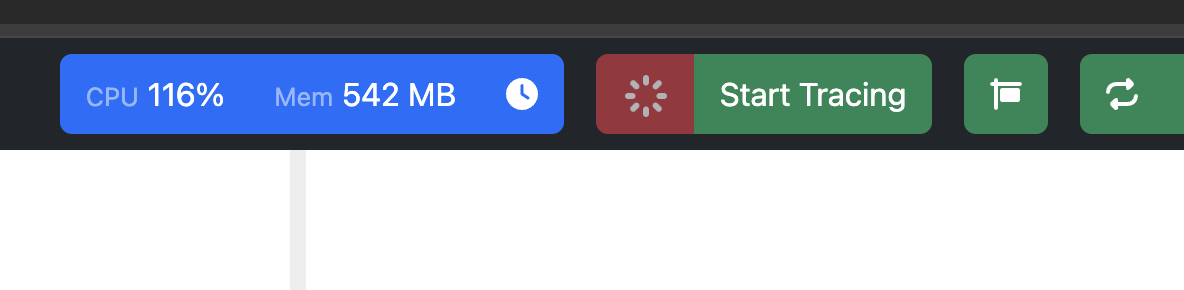
<li><strong>Click Start Tracing</strong> in AkitaRTM when you're ready to record.<br>
<img decoding="async" loading="lazy" alt="AkitaRTM Start Tracing button" src="https://akitasim.dev/assets/images/akitartm_not_tracing-b4fef0b2d5516bd06e2ff3abf7ef26a5.png" width="1184" height="290" class="img_ev3q"></li>
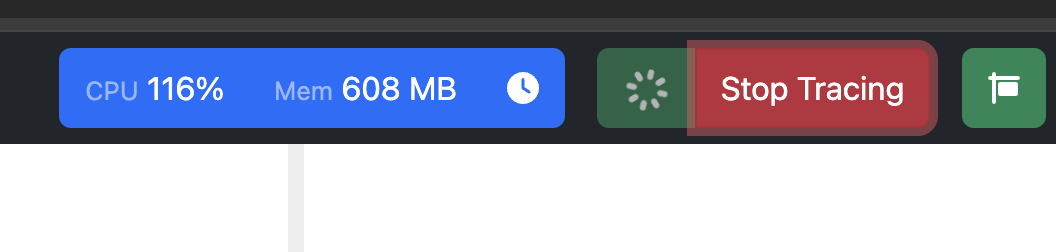
<li>AkitaRTM displays a <strong>recording indicator</strong> so you can confirm collection is active.<br>
<img decoding="async" loading="lazy" alt="AkitaRTM Stop Tracing button while recording" src="https://akitasim.dev/assets/images/akitartm_tracing-67b21b44d08654318d1bde1d926379aa.png" width="1056" height="252" class="img_ev3q"></li>
<li><strong>Click Stop Tracing</strong> once you've captured enough cycles.</li>
<li><strong>Open Daisen</strong> and analyze the collected window.</li>
</ol>
<p>The same workflow applies when you want to capture a specific event mid-run—say, a sudden performance drop. Just start tracing near the moment you care about and stop after you have enough data.</p>
<h2 class="anchor anchorWithStickyNavbar_LWe7" id="simpler-setup">Simpler Setup<a href="https://akitasim.dev/blog/click-to-capture-daisen-traces#simpler-setup" class="hash-link" aria-label="Direct link to Simpler Setup" title="Direct link to Simpler Setup">​</a></h2>
<p>You <strong>no longer need to manually attach visualization tracers</strong> in your configuration code.</p>
<p>As long as your components are registered with the simulation (the standard pattern), the framework automatically wires up AkitaRTM and the Daisen trace collector. The tracing button just works.</p>
<h2 class="anchor anchorWithStickyNavbar_LWe7" id="what-youll-see-in-daisen">What You'll See in Daisen<a href="https://akitasim.dev/blog/click-to-capture-daisen-traces#what-youll-see-in-daisen" class="hash-link" aria-label="Direct link to What You'll See in Daisen" title="Direct link to What You'll See in Daisen">​</a></h2>
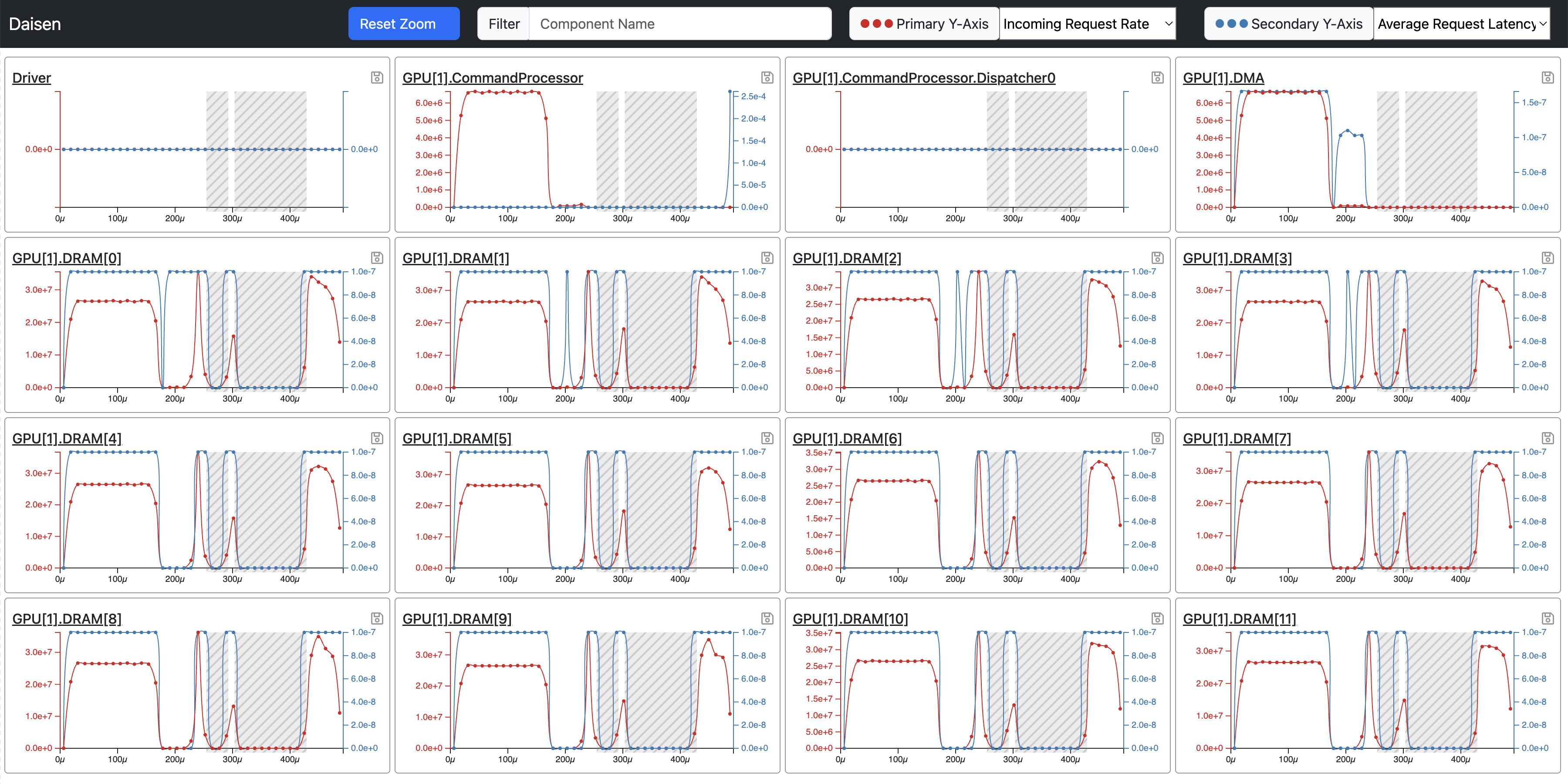
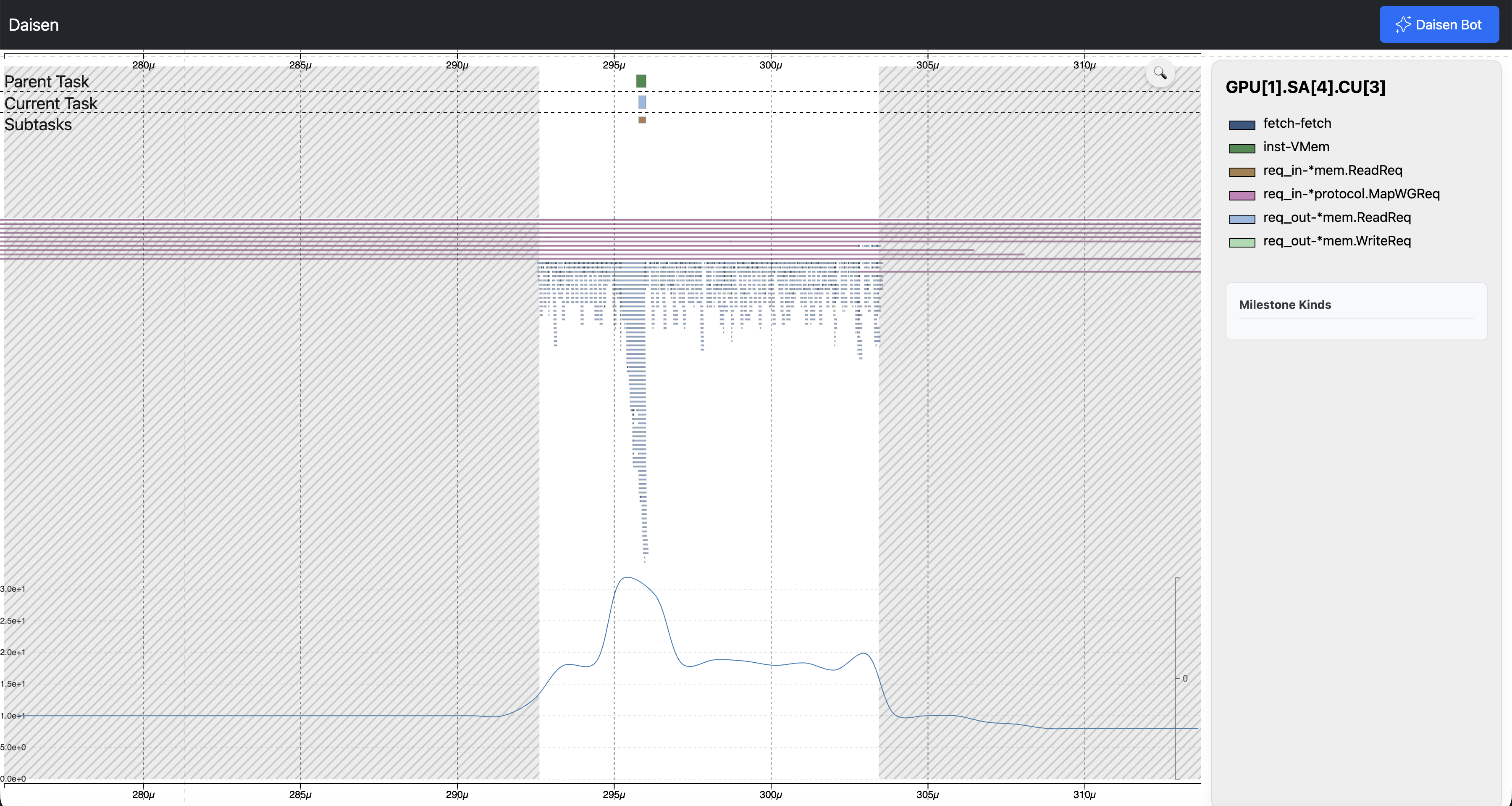
<p>Daisen clearly distinguishes recorded regions from unrecorded ones. <strong>Shaded areas</strong> mark the time ranges where traces were <em>not</em> collected.</p>
<p><img decoding="async" loading="lazy" alt="Daisen shaded dashboard view" src="https://akitasim.dev/assets/images/daisen_shade_dashboard-a3b127227b67cebb8e5acdec7e62fcea.png" width="3600" height="1800" class="img_ev3q"></p>
<p><img decoding="async" loading="lazy" alt="Daisen shaded task details" src="https://akitasim.dev/assets/images/daisen_shade_details-f718ab16cb431a795ed24c4de7f10fdd.png" width="3600" height="1918" class="img_ev3q"></p>
<p>A task appears in the trace if it <strong>overlaps the collection window by at least one cycle</strong>. This inclusive boundary makes the data easy to work with—tasks that barely cross the start or stop point still show up.</p>
<h2 class="anchor anchorWithStickyNavbar_LWe7" id="tracing-from-cycle-0">Tracing from Cycle 0<a href="https://akitasim.dev/blog/click-to-capture-daisen-traces#tracing-from-cycle-0" class="hash-link" aria-label="Direct link to Tracing from Cycle 0" title="Direct link to Tracing from Cycle 0">​</a></h2>
<p>If you know upfront that you want traces from the very beginning, <code>--trace-vis</code> still does exactly that: it starts collection immediately when the simulation launches.</p>
<p>Without <code>--trace-vis</code>, you can still collect traces later. The <strong>Start Tracing</strong> button in AkitaRTM works at any point during execution, even if the simulation started with tracing disabled.</p>
<h2 class="anchor anchorWithStickyNavbar_LWe7" id="why-this-matters">Why This Matters<a href="https://akitasim.dev/blog/click-to-capture-daisen-traces#why-this-matters" class="hash-link" aria-label="Direct link to Why This Matters" title="Direct link to Why This Matters">​</a></h2>
<p>This feature aligns with how tracing is actually used in practice:</p>
<ul>
<li><strong>Run first, then record</strong>—capture a short, stable window (or any window you care about).</li>
<li><strong>No guesswork</strong>—stop estimating cycle ranges ahead of time.</li>
<li><strong>Smaller, focused traces</strong>—keep output files manageable.</li>
<li><strong>Seamless handoff</strong>—go directly from "I see it in AkitaRTM" to "I can analyze it in Daisen."</li>
</ul>
<p>At its core, this change reflects a broader design philosophy: simulation tools should adapt to how researchers actually work, not the other way around. The old approach—predicting cycle ranges before running—forced users into a tedious guess-and-rerun loop. Interactive tracing eliminates that friction, making detailed performance analysis accessible without requiring clairvoyance or patience for multi-hour trace dumps.</p>]]></content>
        <author>
            <name>Yifan Sun</name>
            <uri>https://sarchlab.org/syifan</uri>
        </author>
        <category label="akita" term="akita"/>
        <category label="daisen" term="daisen"/>
        <category label="tracing" term="tracing"/>
    </entry>
    <entry>
        <title type="html"><![CDATA[Introducing the Data Recording Package in Akita]]></title>
        <id>https://akitasim.dev/blog/data-recording-package-in-akita</id>
        <link href="https://akitasim.dev/blog/data-recording-package-in-akita"/>
        <updated>2025-06-03T21:13:38.000Z</updated>
        <summary type="html"><![CDATA[We have added a dedicated package for data recording in Akita.]]></summary>
        <content type="html"><![CDATA[<p>We have added a dedicated package for data recording in Akita.</p>
<h2 class="anchor anchorWithStickyNavbar_LWe7" id="problems">Problems<a href="https://akitasim.dev/blog/data-recording-package-in-akita#problems" class="hash-link" aria-label="Direct link to Problems" title="Direct link to Problems">​</a></h2>
<p>In the past, we use rather ad-hoc methods to record data in Akita. For example, MGPUSim metrics are dumped into a CSV file named <code>metrics.csv</code> in the working directory. Daisen traces are recorded in a SQLite file. We also collect traces for Vis4Mesh, but the code was not fully integrated into the main codebase. We consider this is not a good practice as users may not be able to find the data and matches the data with the simulation executed.</p>
<h2 class="anchor anchorWithStickyNavbar_LWe7" id="solution">Solution<a href="https://akitasim.dev/blog/data-recording-package-in-akita#solution" class="hash-link" aria-label="Direct link to Solution" title="Direct link to Solution">​</a></h2>
<p>We create a dedicated service package called <code>datarecording</code> to record data in Akita. With <code>datarecording</code>, we can record all the data from one simulation run into a SQLite file. Different data types are stored in different tables. Users can use a few simple APIs to record any type of data easily.</p>
<h2 class="anchor anchorWithStickyNavbar_LWe7" id="how-to-use">How to Use<a href="https://akitasim.dev/blog/data-recording-package-in-akita#how-to-use" class="hash-link" aria-label="Direct link to How to Use" title="Direct link to How to Use">​</a></h2>
<p>It is very easy to use <code>datarecording</code> service package. It only takes a few simple steps.</p>
<p>First, create a new data recorder:</p>
<div class="language-go codeBlockContainer_Ckt0 theme-code-block" style="--prism-color:#393A34;--prism-background-color:#f6f8fa"><div class="codeBlockContent_QJqH"><pre tabindex="0" class="prism-code language-go codeBlock_bY9V thin-scrollbar" style="color:#393A34;background-color:#f6f8fa"><code class="codeBlockLines_e6Vv"><span class="token-line" style="color:#393A34"><span class="token plain">recorder </span><span class="token operator" style="color:#393A34">:=</span><span class="token plain"> datarecording</span><span class="token punctuation" style="color:#393A34">.</span><span class="token function" style="color:#d73a49">NewDataRecorder</span><span class="token punctuation" style="color:#393A34">(</span><span class="token string" style="color:#e3116c">"data"</span><span class="token punctuation" style="color:#393A34">)</span><br></span></code></pre></div></div>
<p>Alternatively, rather than creating a <code>DataRecorder</code> object, we recommend to directly create a <code>Simulation</code> object, which automatically creates several elements, including the <code>Engine</code>, the <code>DataRecorder</code>, the AkitaRTM <code>Monitor</code>, and the Daisen <code>VisTracer</code>. Then, users can simply use <code>simulation.GetDataRecorder()</code> to retrieve the <code>DataRecorder</code> object.</p>
<div class="language-go codeBlockContainer_Ckt0 theme-code-block" style="--prism-color:#393A34;--prism-background-color:#f6f8fa"><div class="codeBlockContent_QJqH"><pre tabindex="0" class="prism-code language-go codeBlock_bY9V thin-scrollbar" style="color:#393A34;background-color:#f6f8fa"><code class="codeBlockLines_e6Vv"><span class="token-line" style="color:#393A34"><span class="token plain">s </span><span class="token operator" style="color:#393A34">:=</span><span class="token plain"> simulation</span><span class="token punctuation" style="color:#393A34">.</span><span class="token function" style="color:#d73a49">MakeBuilder</span><span class="token punctuation" style="color:#393A34">(</span><span class="token punctuation" style="color:#393A34">)</span><span class="token punctuation" style="color:#393A34">.</span><span class="token function" style="color:#d73a49">Build</span><span class="token punctuation" style="color:#393A34">(</span><span class="token punctuation" style="color:#393A34">)</span><span class="token plain"></span><br></span><span class="token-line" style="color:#393A34"><span class="token plain">recorder </span><span class="token operator" style="color:#393A34">:=</span><span class="token plain"> s</span><span class="token punctuation" style="color:#393A34">.</span><span class="token function" style="color:#d73a49">GetDataRecorder</span><span class="token punctuation" style="color:#393A34">(</span><span class="token punctuation" style="color:#393A34">)</span><br></span></code></pre></div></div>
<p>Then, users can create a table that represent a certain type of data. For example, to record the metrics of a simulation, users can create a table called <code>metrics</code> with the following code:</p>
<div class="language-go codeBlockContainer_Ckt0 theme-code-block" style="--prism-color:#393A34;--prism-background-color:#f6f8fa"><div class="codeBlockContent_QJqH"><pre tabindex="0" class="prism-code language-go codeBlock_bY9V thin-scrollbar" style="color:#393A34;background-color:#f6f8fa"><code class="codeBlockLines_e6Vv"><span class="token-line" style="color:#393A34"><span class="token keyword" style="color:#00009f">type</span><span class="token plain"> metric </span><span class="token keyword" style="color:#00009f">struct</span><span class="token plain"> </span><span class="token punctuation" style="color:#393A34">{</span><span class="token plain"></span><br></span><span class="token-line" style="color:#393A34"><span class="token plain">	Location </span><span class="token builtin">string</span><span class="token plain"></span><br></span><span class="token-line" style="color:#393A34"><span class="token plain">	What     </span><span class="token builtin">string</span><span class="token plain"></span><br></span><span class="token-line" style="color:#393A34"><span class="token plain">	Value    </span><span class="token builtin">float64</span><span class="token plain"></span><br></span><span class="token-line" style="color:#393A34"><span class="token plain">	Unit     </span><span class="token builtin">string</span><span class="token plain"></span><br></span><span class="token-line" style="color:#393A34"><span class="token plain"></span><span class="token punctuation" style="color:#393A34">}</span><span class="token plain"></span><br></span><span class="token-line" style="color:#393A34"><span class="token plain" style="display:inline-block"></span><br></span><span class="token-line" style="color:#393A34"><span class="token plain">recorder</span><span class="token punctuation" style="color:#393A34">.</span><span class="token function" style="color:#d73a49">CreateTable</span><span class="token punctuation" style="color:#393A34">(</span><span class="token string" style="color:#e3116c">"metrics"</span><span class="token punctuation" style="color:#393A34">,</span><span class="token plain"> metric</span><span class="token punctuation" style="color:#393A34">{</span><span class="token punctuation" style="color:#393A34">}</span><span class="token punctuation" style="color:#393A34">)</span><br></span></code></pre></div></div>
<p>Here, we pass a <code>metric</code> struct to the <code>CreateTable</code> function. The <code>metric</code> struct serves as the schema of the table.</p>
<div class="theme-admonition theme-admonition-warning admonition_xJq3 alert alert--warning"><div class="admonitionHeading_Gvgb"><span class="admonitionIcon_Rf37"><svg viewBox="0 0 16 16"><path fill-rule="evenodd" d="M8.893 1.5c-.183-.31-.52-.5-.887-.5s-.703.19-.886.5L.138 13.499a.98.98 0 0 0 0 1.001c.193.31.53.501.886.501h13.964c.367 0 .704-.19.877-.5a1.03 1.03 0 0 0 .01-1.002L8.893 1.5zm.133 11.497H6.987v-2.003h2.039v2.003zm0-3.004H6.987V5.987h2.039v4.006z"></path></svg></span>warning</div><div class="admonitionContent_BuS1"><p>All the fields in the struct must be exported. The <code>datarecording</code> package will use reflection to create the table schema. The struct itself can be unexported. Also, the struct must be a plain struct. No list, maps, or other complex types are allowed.</p></div></div>
<p>After creating the table, users can record data into the table by calling <code>InsertData</code> method. For example, to record a metric, users can call the following code:</p>
<div class="language-go codeBlockContainer_Ckt0 theme-code-block" style="--prism-color:#393A34;--prism-background-color:#f6f8fa"><div class="codeBlockContent_QJqH"><pre tabindex="0" class="prism-code language-go codeBlock_bY9V thin-scrollbar" style="color:#393A34;background-color:#f6f8fa"><code class="codeBlockLines_e6Vv"><span class="token-line" style="color:#393A34"><span class="token plain">recorder</span><span class="token punctuation" style="color:#393A34">.</span><span class="token function" style="color:#d73a49">InsertData</span><span class="token punctuation" style="color:#393A34">(</span><span class="token string" style="color:#e3116c">"metrics"</span><span class="token punctuation" style="color:#393A34">,</span><span class="token plain"> metric</span><span class="token punctuation" style="color:#393A34">{</span><span class="token plain"></span><br></span><span class="token-line" style="color:#393A34"><span class="token plain">	Location</span><span class="token punctuation" style="color:#393A34">:</span><span class="token plain"> </span><span class="token string" style="color:#e3116c">"GPU"</span><span class="token punctuation" style="color:#393A34">,</span><span class="token plain"></span><br></span><span class="token-line" style="color:#393A34"><span class="token plain">	What</span><span class="token punctuation" style="color:#393A34">:</span><span class="token plain">     </span><span class="token string" style="color:#e3116c">"Memory Usage"</span><span class="token punctuation" style="color:#393A34">,</span><span class="token plain"></span><br></span><span class="token-line" style="color:#393A34"><span class="token plain">	Value</span><span class="token punctuation" style="color:#393A34">:</span><span class="token plain">    </span><span class="token number" style="color:#36acaa">100</span><span class="token punctuation" style="color:#393A34">,</span><span class="token plain"></span><br></span><span class="token-line" style="color:#393A34"><span class="token plain">	Unit</span><span class="token punctuation" style="color:#393A34">:</span><span class="token plain">     </span><span class="token string" style="color:#e3116c">"MB"</span><span class="token punctuation" style="color:#393A34">,</span><span class="token plain"></span><br></span><span class="token-line" style="color:#393A34"><span class="token plain"></span><span class="token punctuation" style="color:#393A34">}</span><span class="token punctuation" style="color:#393A34">)</span><br></span></code></pre></div></div>
<h2 class="anchor anchorWithStickyNavbar_LWe7" id="performance-optimization">Performance Optimization<a href="https://akitasim.dev/blog/data-recording-package-in-akita#performance-optimization" class="hash-link" aria-label="Direct link to Performance Optimization" title="Direct link to Performance Optimization">​</a></h2>
<p>Often, we want to create indices on fields to define data constrains or speed up data retrieval. We allow users to add struct tags to the fields to specify the index. For example, to create an index on the <code>Location</code> field, users can add the following tag to the <code>Location</code> field:</p>
<div class="language-go codeBlockContainer_Ckt0 theme-code-block" style="--prism-color:#393A34;--prism-background-color:#f6f8fa"><div class="codeBlockContent_QJqH"><pre tabindex="0" class="prism-code language-go codeBlock_bY9V thin-scrollbar" style="color:#393A34;background-color:#f6f8fa"><code class="codeBlockLines_e6Vv"><span class="token-line" style="color:#393A34"><span class="token keyword" style="color:#00009f">type</span><span class="token plain"> metric </span><span class="token keyword" style="color:#00009f">struct</span><span class="token plain"> </span><span class="token punctuation" style="color:#393A34">{</span><span class="token plain"></span><br></span><span class="token-line" style="color:#393A34"><span class="token plain">	ID       </span><span class="token builtin">int</span><span class="token plain">    </span><span class="token string" style="color:#e3116c">`akita_data:"unique"`</span><span class="token plain"></span><br></span><span class="token-line" style="color:#393A34"><span class="token plain">	Location </span><span class="token builtin">string</span><span class="token plain"> </span><span class="token string" style="color:#e3116c">`akita_data:"index"`</span><span class="token plain"></span><br></span><span class="token-line" style="color:#393A34"><span class="token plain">	What     </span><span class="token builtin">string</span><span class="token plain"></span><br></span><span class="token-line" style="color:#393A34"><span class="token plain">	Value    </span><span class="token builtin">float64</span><span class="token plain"></span><br></span><span class="token-line" style="color:#393A34"><span class="token plain">	Unit     </span><span class="token builtin">string</span><span class="token plain"></span><br></span><span class="token-line" style="color:#393A34"><span class="token plain"></span><span class="token punctuation" style="color:#393A34">}</span><br></span></code></pre></div></div>
<p>The <code>akita_data:"index"</code> tag will create an index on the <code>Location</code> field. The <code>akita_data:"unique"</code> tag will create a unique index on the <code>ID</code> field.</p>
<h2 class="anchor anchorWithStickyNavbar_LWe7" id="recording-the-execution">Recording the Execution<a href="https://akitasim.dev/blog/data-recording-package-in-akita#recording-the-execution" class="hash-link" aria-label="Direct link to Recording the Execution" title="Direct link to Recording the Execution">​</a></h2>
<p>Every time a data recorder is created, we always record the execution information into a table called <code>exec_info</code>. The tables contains a few fields, including the working directory, the command line arguments, the start time, and the end time.</p>
<h2 class="anchor anchorWithStickyNavbar_LWe7" id="whats-next">What's Next?<a href="https://akitasim.dev/blog/data-recording-package-in-akita#whats-next" class="hash-link" aria-label="Direct link to What's Next?" title="Direct link to What's Next?">​</a></h2>
<p>Providing easy analysis capability is always a main goal of Akita. We will continue to add more features to the <code>datarecording</code> package to make it easier to use. Moreover, we will adapt the current simulator code to use the <code>datarecording</code> package. For more information, please refer to the <a href="https://akitasim.dev/docs/akita/getting_deeper/data_recorder">documentation</a>.</p>]]></content>
        <author>
            <name>Zhongwang Xu</name>
            <uri>https://sarchlab.org/xzhongwang</uri>
        </author>
        <author>
            <name>Yifan Sun</name>
            <uri>https://sarchlab.org/syifan</uri>
        </author>
        <category label="akita" term="akita"/>
        <category label="datarecording" term="datarecording"/>
    </entry>
    <entry>
        <title type="html"><![CDATA[A New Runner in MGPUSim]]></title>
        <id>https://akitasim.dev/blog/a-new-runner-in-mgpusim</id>
        <link href="https://akitasim.dev/blog/a-new-runner-in-mgpusim"/>
        <updated>2025-05-20T02:32:21.000Z</updated>
        <summary type="html"><![CDATA[We have recently fully rewritten the `runner` package, which serves as the configuration file for MGPUSim.]]></summary>
        <content type="html"><![CDATA[<p>We have recently fully rewritten the <code>runner</code> package, which serves as the configuration file for MGPUSim.</p>
<p>Yet another 3000+/4000- line of code <a href="https://github.com/sarchlab/mgpusim/pull/173" target="_blank" rel="noopener noreferrer">pull request</a>.</p>
<h2 class="anchor anchorWithStickyNavbar_LWe7" id="problems">Problems<a href="https://akitasim.dev/blog/a-new-runner-in-mgpusim#problems" class="hash-link" aria-label="Direct link to Problems" title="Direct link to Problems">​</a></h2>
<p>If you have used MGPUSim before, you may hate the runner code as it is probably the most messy part of the codebase. Now, it is time to rewrite it.</p>
<p>So, what is the problem before? Several things:</p>
<ul>
<li>The filenames are not easy to understand and search.</li>
<li>Complex dependencies between different components.</li>
<li>There are several simulation-level elements, such as the monitor, the visualization tracer, etc. are mixed in the configuration code. What is worse, every component may have a different way to link with those simulation-level elements.</li>
</ul>
<p>Therefore, we want to have a new runner that is more organized and easier to understand.</p>
<h2 class="anchor anchorWithStickyNavbar_LWe7" id="domain-based-configuration">Domain-Based Configuration<a href="https://akitasim.dev/blog/a-new-runner-in-mgpusim#domain-based-configuration" class="hash-link" aria-label="Direct link to Domain-Based Configuration" title="Direct link to Domain-Based Configuration">​</a></h2>
<p>Two related concepts here: (1) A <code>Component</code> is a struct that implements some hardware logic. For example, a command processor, a compute unit, a memory controller, etc. (2) A <code>Domain</code> is a collection of components that are connected closely together. For example, we consider a GPU as a domain, which contains a command processor, several compute units, and several memory controllers, etc.</p>
<p>So the most critical change is to have one package to build each domain. Instead of a flat structure, we now have the file structure as follows:</p>
<div class="language-text codeBlockContainer_Ckt0 theme-code-block" style="--prism-color:#393A34;--prism-background-color:#f6f8fa"><div class="codeBlockContent_QJqH"><pre tabindex="0" class="prism-code language-text codeBlock_bY9V thin-scrollbar" style="color:#393A34;background-color:#f6f8fa"><code class="codeBlockLines_e6Vv"><span class="token-line" style="color:#393A34"><span class="token plain">runner/</span><br></span><span class="token-line" style="color:#393A34"><span class="token plain">├── emusystem/</span><br></span><span class="token-line" style="color:#393A34"><span class="token plain">│   ├── emugpu/</span><br></span><span class="token-line" style="color:#393A34"><span class="token plain">│   │   ├── builder.go</span><br></span><span class="token-line" style="color:#393A34"><span class="token plain">│   └── builder.go</span><br></span><span class="token-line" style="color:#393A34"><span class="token plain">├── timingconfig/</span><br></span><span class="token-line" style="color:#393A34"><span class="token plain">│   ├── r9nano/</span><br></span><span class="token-line" style="color:#393A34"><span class="token plain">│   │   ├── builder.go</span><br></span><span class="token-line" style="color:#393A34"><span class="token plain">│   ├── shaderarray/</span><br></span><span class="token-line" style="color:#393A34"><span class="token plain">│   │   ├── builder.go</span><br></span><span class="token-line" style="color:#393A34"><span class="token plain">│   └── builder.go</span><br></span><span class="token-line" style="color:#393A34"><span class="token plain">└── runner.go</span><br></span></code></pre></div></div>
<p>For example, now, a <code>ShaderArray</code> is a domain. For each domain, we have a <code>builder.go</code> file that defines the components and how they are internally connected together. Also, the <code>builder.go</code> file will determine what components' ports are exposed to the outside of the domain. Even the outside-most level is considered a domain (e.g., <code>timingconfig</code>). It just have no exposed ports.</p>
<p>We require an outer-level domain to only interact with the exposed ports of the inside domains. For example, the <code>r9nano</code> domain can only interact with the exposed ports of the <code>ShaderArray</code> domain. It cannot directly access the <code>ShaderArray</code> components.</p>
<h2 class="anchor anchorWithStickyNavbar_LWe7" id="use-of-simulation-struct-from-akita">Use of <code>Simulation</code> Struct from Akita.<a href="https://akitasim.dev/blog/a-new-runner-in-mgpusim#use-of-simulation-struct-from-akita" class="hash-link" aria-label="Direct link to use-of-simulation-struct-from-akita" title="Direct link to use-of-simulation-struct-from-akita">​</a></h2>
<p>A recent update in Akita is that now we have a <code>Simulation</code> struct. It bundles commonly used resources, such as the Data Recorder, the Monitor, and the Visualization Tracer. <code>Simulation</code> struct also centrally manages all the components and ports used in the system. The simulation struct totally changed how to link the global resources to the components.</p>
<p>Previously, we are likely need to pass the <code>Monitor</code> and the <code>DataRecorder</code> to each builder, which adds complexity and make the code difficult to maintain. Now, we centralize the linking process.</p>
<p>When a component is created, we need to register it to the <code>Simulation</code> struct. But that is all we need to do when we create components. When registering the component, the <code>Simulation</code> struct will automatically register it to the monitor.</p>
<p>For attaching tracers or hooks, we now process them after all the components are created. Since the <code>Simulation</code> struct can list all the components, we use a string matching method to identify the components that need to be attached with a tracer or hook. Users can always use a regular expression to match the component name for finer-grained control.</p>
<p>Below is an example of how to attach a tracer to all the Command Processors in the system. While this is not particularly efficient, since it is only executed once during the configuration, it is still acceptable.</p>
<div class="language-go codeBlockContainer_Ckt0 theme-code-block" style="--prism-color:#393A34;--prism-background-color:#f6f8fa"><div class="codeBlockContent_QJqH"><pre tabindex="0" class="prism-code language-go codeBlock_bY9V thin-scrollbar" style="color:#393A34;background-color:#f6f8fa"><code class="codeBlockLines_e6Vv"><span class="token-line" style="color:#393A34"><span class="token keyword" style="color:#00009f">for</span><span class="token plain"> </span><span class="token boolean" style="color:#36acaa">_</span><span class="token punctuation" style="color:#393A34">,</span><span class="token plain"> comp </span><span class="token operator" style="color:#393A34">:=</span><span class="token plain"> </span><span class="token keyword" style="color:#00009f">range</span><span class="token plain"> s</span><span class="token punctuation" style="color:#393A34">.</span><span class="token function" style="color:#d73a49">Components</span><span class="token punctuation" style="color:#393A34">(</span><span class="token punctuation" style="color:#393A34">)</span><span class="token plain"> </span><span class="token punctuation" style="color:#393A34">{</span><span class="token plain"></span><br></span><span class="token-line" style="color:#393A34"><span class="token plain">  </span><span class="token keyword" style="color:#00009f">if</span><span class="token plain"> strings</span><span class="token punctuation" style="color:#393A34">.</span><span class="token function" style="color:#d73a49">Contains</span><span class="token punctuation" style="color:#393A34">(</span><span class="token plain">comp</span><span class="token punctuation" style="color:#393A34">.</span><span class="token function" style="color:#d73a49">Name</span><span class="token punctuation" style="color:#393A34">(</span><span class="token punctuation" style="color:#393A34">)</span><span class="token punctuation" style="color:#393A34">,</span><span class="token plain"> </span><span class="token string" style="color:#e3116c">"CommandProcessor"</span><span class="token punctuation" style="color:#393A34">)</span><span class="token plain"> </span><span class="token punctuation" style="color:#393A34">{</span><span class="token plain"></span><br></span><span class="token-line" style="color:#393A34"><span class="token plain">    tracer </span><span class="token operator" style="color:#393A34">:=</span><span class="token plain"> tracing</span><span class="token punctuation" style="color:#393A34">.</span><span class="token function" style="color:#d73a49">NewBusyTimeTracer</span><span class="token punctuation" style="color:#393A34">(</span><span class="token operator" style="color:#393A34">...</span><span class="token punctuation" style="color:#393A34">)</span><span class="token plain"></span><br></span><span class="token-line" style="color:#393A34"><span class="token plain">    tracing</span><span class="token punctuation" style="color:#393A34">.</span><span class="token function" style="color:#d73a49">CollectTrace</span><span class="token punctuation" style="color:#393A34">(</span><span class="token plain">comp</span><span class="token punctuation" style="color:#393A34">,</span><span class="token plain"> tracer</span><span class="token punctuation" style="color:#393A34">)</span><span class="token plain"></span><br></span><span class="token-line" style="color:#393A34"><span class="token plain">  </span><span class="token punctuation" style="color:#393A34">}</span><span class="token plain"></span><br></span><span class="token-line" style="color:#393A34"><span class="token plain"></span><span class="token punctuation" style="color:#393A34">}</span><br></span></code></pre></div></div>
<h2 class="anchor anchorWithStickyNavbar_LWe7" id="whats-next">What's Next?<a href="https://akitasim.dev/blog/a-new-runner-in-mgpusim#whats-next" class="hash-link" aria-label="Direct link to What's Next?" title="Direct link to What's Next?">​</a></h2>
<p>The MGPUSim runner always provides examples for configuration of Akita-based simulators. So we hope other simulators can follow the pattern.</p>
<p>There are still some problems with circular dependencies between domains and components. So, we will continue to improve the runner logic.</p>]]></content>
        <author>
            <name>Yifan Sun</name>
            <uri>https://sarchlab.org/syifan</uri>
        </author>
        <category label="mgpusim" term="mgpusim"/>
        <category label="runner" term="runner"/>
    </entry>
</feed>